

Fog 3D effect
The Fog 3D effect simulates fog by behaving as though there is a scattering medium in the air that makes objects look more diffuse as they get more distant along the z axis.
This effect works with 8-bpc color.
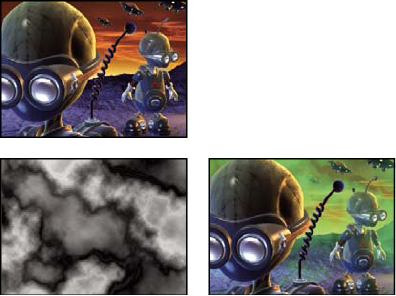
Original (top left), Gradient Layer (bottom left), and with
Fog 3D applied (bottom right)
- Fog Start Depth
-
Where along the z axis the diffuse scattering begins.
 To determine the depth of an object, click it in
the Composition panel or Layer panel using the Selection tool while
the effect is selected.
To determine the depth of an object, click it in
the Composition panel or Layer panel using the Selection tool while
the effect is selected. - Fog End Depth
- Where along the z axis the diffusion reaches its maximum.
- Scattering Density
- Determines how quickly the scattering occurs. The higher the value, the more dense the fog appears from its starting point.
- Foggy Background
- Creates a foggy background (default). Deselect to create transparency at the back of the 3D scene for compositing on top of another layer.
- Gradient Layer
- (Optional) A grayscale layer to use as a control layer, the luminance values of which apply to fog density. For example, use the Fractal Noise effect to create a swirling control layer for atmospheric fog. Make sure that the dimensions of the gradient layer are at least as great as the dimensions of the 3D scene layer.
- Layer Contribution
- How much the gradient layer affects the fog density.