

Levels effect
The Levels effect remaps the range of input color levels onto a new range of output color levels, with a distribution of color values determined by the gamma value. This effect functions much the same as the Levels adjustment in Photoshop.
This effect works with 8-bpc, 16-bpc, and 32-bpc color.
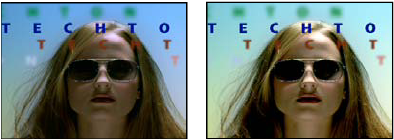
Original (left), and with effect applied (right)
- Channel
- The color channels to be modified.
- Histogram
- Shows number of pixels with each luminance value in an image.
- Input Black and Output Black
- Pixels in the input image with a luminance value equal to the Input Black value are given the Output Black value as their new luminance value. The Input Black value is represented by the upper left triangle below the histogram. The Output Black value is represented by the lower left triangle below the histogram.
- Input White and Output White
- Pixels in the input image with a luminance value equal to the Input White value are given the Output White value as their new luminance value. The Input White value is represented by the upper right triangle below the histogram. The Output White value is represented by the lower right triangle below the histogram.
- Gamma
- The exponent of the power curve that determines the distribution of luminance values in the output image. The Gamma value is represented by the middle triangle below the histogram.
- Clip To Output Black and Clip To Output White
- These controls determine the results for pixels with luminance values that are less than the Input Black value or greater than the Input White value. If clipping is on, pixels with luminance values less than the Input Black value are mapped to the Output Black value; pixels with luminance values above the Input White value are mapped to the Output White value. If clipping is off, the resulting pixel values can be less than the Output Black value or greater than the Output White value and are affected by the Gamma value.