

Bulge effect
The Bulge effect distorts an image around a specified point, making the image appear to bulge toward or away from the viewer, depending on the options you select.
This effect works with 8-bpc and 16-bpc color.
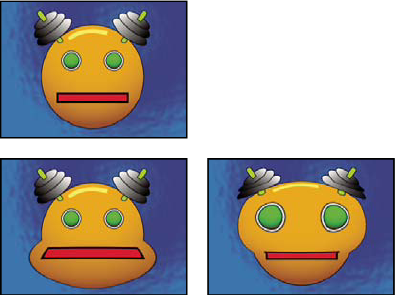
Original (top left), and with variations of Bulge applied
(bottom left and right)
- Horizontal Radius and Vertical Radius
- The width and height of the distorted area, in pixels. You can also set the radius values by dragging the selection handles in the layer.
- Bulge Height
- The apparent depth of the bulge. Positive values push the bulge toward the viewer. Negative values pull the bulge away from the viewer.
- Taper Radius
- The shallowness of the sides of the bulge. A taper radius of 0 produces a steep, pronounced bulge.
- Antialiasing
- The amount of edge smoothing (blending of colors) at the boundaries of the bulge. Anti-aliasing is applied only when the layer quality is set to Best.
- Pin All Edges
- Prevents the edges of the layer from bulging.