

Corner Pin effect
The Corner Pin effect distorts an image by repositioning each of its four corners. Use it to stretch, shrink, skew, or twist an image or to simulate perspective or movement that pivots from the edge of a layer, such as a door opening. You can also use it to attach a layer to a moving rectangular region tracked by the Motion Tracker. You can move the corner pins in the Composition panel, the Timeline panel, or the Effect Controls panel.
This effect works with 8-bpc, 16-bpc, and 32-bpc color.
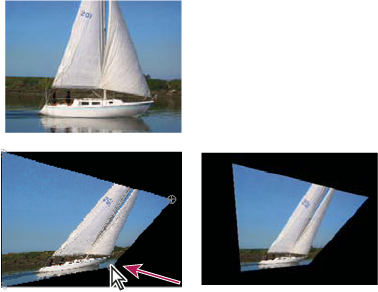
Original image (top left), corner moved (bottom left), and
final image (bottom right)