

Flip a layer
A layer flips around its anchor point. If you move the anchor point away from the center of the layer, the layer may move when you flip it.
- Select one or more layers.
- Press S to reveal the Scale property.
- Right-click (Windows) or Control-click (Mac OS) the underlined Scale value and choose Edit Value from the pop-up menu that appears.
- In the Scale dialog box, choose None from the Preserve pop-up menu.
- Do one of the following:
-
To flip horizontally, enter a negative Width value.
-
To flip vertically, enter a negative Height value.
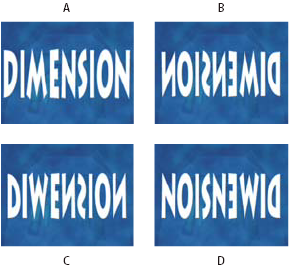 Layer flipped with varying Height and Width values
- A.
- Width 100, Height 100
- B.
- Width -100, Height 100
- C.
- Width 100, Height -100
- D.
- Width -100, Height -100
-
 To flip a layer by dragging in the
Composition panel, drag a layer handle across the layer’s anchor
point. (See Show or hide layer controls in the Composition panel.)
To flip a layer by dragging in the
Composition panel, drag a layer handle across the layer’s anchor
point. (See Show or hide layer controls in the Composition panel.)