

Example: Offset characters
This example illustrates how you can easily animate random characters so that they gradually form a legible word or phrase. To do this, specify a Character Offset value and animate the range selector.
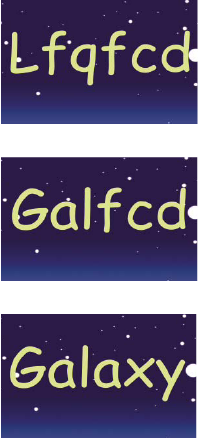
Animating the offset values for the characters in the word Galaxy
- Create a new composition.
- Create a new text layer with the word Galaxy.
- Choose Animation > Animate Text > Character Offset.
- In the Timeline panel, set the Character Offset value to 5.
- Expand Range Selector 1.
- Click the Start stopwatch to set an initial keyframe at 0 seconds and set the value to 0%.
- Move the current-time indicator to 5 seconds and set the Start value to 100%.
- Set Character Alignment to Center.
- Preview the composition.