

Merge Paths options
The Merge Paths path operation takes all
of the paths above it in the same group as input. The output is
a single path that combines the input paths. The input paths are
still visible in the Timeline panel, but they are essentially removed
from the rendering of the shape layer, so they don’t appear in the
Composition panel. A fill and stroke are added after the Merge Paths
property group in the Timeline panel if a fill and stroke are not
already present; otherwise, the output path wouldn’t be visible.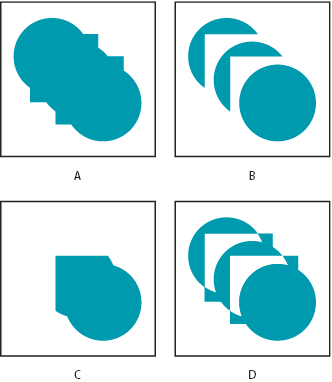
Merge Paths options
- A.
- Add for all shapes
- B.
- Subtract for squares
- C.
- Intersect for squares
- D.
- Exclude Intersections for squares
The Merge Paths path operation has the following options, each of which performs different calculations to determine the output path:
- Merge
- Merges all input paths into a single compound path. This is the default used for shapes created from text characters made up of multiple paths, like the letter e, when using the Create Outlines command.
- Add
- Creates a path that encompasses the union of the areas of the input paths.
- Subtract
- Creates a path that encompasses only the areas defined by the topmost path, subtracting the area defined by underlying paths.
- Intersect
- Creates a path that encompasses only the areas defined by intersections between all input paths.
- Exclude Intersections
- Creates a path that is the union of the areas defined by all input paths, minus the areas defined by intersections between all input paths.