Edit Profile dialog box overview
The Edit Profile dialog box lists all available profiles and shows which document properties are being analyzed. From this dialog box you can unlock and lock a profile, create a new group for organizing profiles, and specify inspection criteria. You can access additional options and information by expanding the profile.
To open the Edit Profile dialog box, expand a profile group in the Preflight dialog box, select a profile, and click Edit (or choose Edit Preflight Profiles from the Options menu).
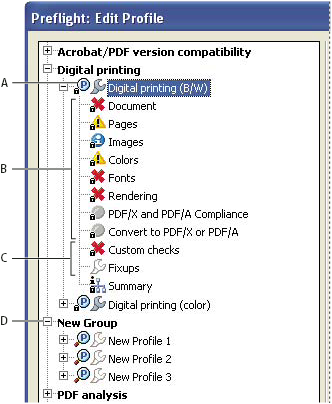
Edit Profile dialog box
- A.
- Profile
- B.
- Predefined set of checks
- C.
- More options
- D.
- Profiles groups