Import comments to a revised PDF
To import new or unresolved comments to a
PDF after the document has been revised, use the Migrate Comments
feature. This feature attempts to place comments in the correct
location by searching specific word groupings and structural elements
in the revised PDF.
Note: Results may be less reliable in untagged
PDFs which lack the internal structure necessary to correctly place
imported comments in a revised document.
Text comments that reference particular words, such as highlights, cross-outs, and insertion carets, appear within the word grouping where they were originally placed. Drawing markups and sticky notes appear in the same structural location as they did in the original document. Circle, polygon, rectangle, and stamp comments always appear on the same page as the original document.
If the revised PDF no longer contains the original word groupings or logical structure order that the comment references, the migrated comment appears on the same page as the original document (or on the last page if the referenced page doesn’t exist). In this case, text edits are converted to note comments.
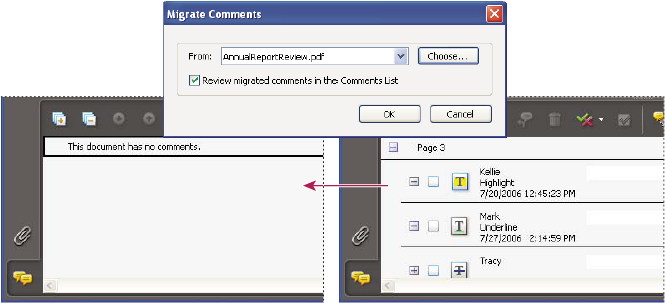
 Migrate comments to a revised PDF
- Open the original PDF and the revised PDF.
- In the revised PDF, choose Comments > Migrate Comments.
- Choose the original PDF from the From menu, and click OK.
 In the Comments List, select the
comment, click the Set Status button
In the Comments List, select the
comment, click the Set Status button  , and choose
Migration > [status].
, and choose
Migration > [status].