Edit a bookmark
You can change a bookmark’s attributes at any time.
 Rename a bookmark
 Select the bookmark in the Bookmarks
panel, choose Rename Bookmark in the Options menu, and type the
new bookmark name.
Select the bookmark in the Bookmarks
panel, choose Rename Bookmark in the Options menu, and type the
new bookmark name.Wrap text in a long bookmark
Click the Bookmarks button, and
choose Wrap Long Bookmarks from the Options menu.
All the text of long bookmarks shows regardless of the width of the navigation pane. (This option is on when checked, and off when not checked.)
Change the text appearance of a
bookmark
You can change the appearance of a bookmark to draw attention to it.
- To change the font size, choose small, medium, or large
for Text Size from the Options menu.
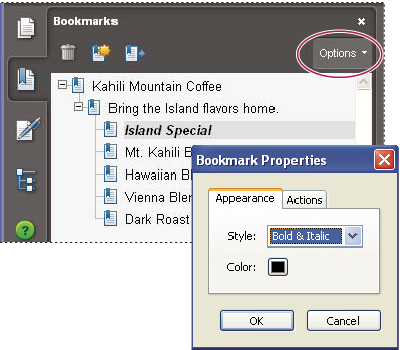 Set a bookmark’s appearance in the Bookmarks Properties dialog box.
- Change the color and style of the text by doing one of the
following:
-
Choose View > Toolbars > Properties Bar to open the Properties toolbar.
-
Right-click/Control-click the bookmark, and select Properties. Click the Appearance tab.
 After you have
defined a bookmark’s appearance, you can reuse the appearance settings
by selecting the bookmark and choosing the Use Current Appearance
As New Default command from the bookmark’s context menu.
After you have
defined a bookmark’s appearance, you can reuse the appearance settings
by selecting the bookmark and choosing the Use Current Appearance
As New Default command from the bookmark’s context menu. -
Change a bookmark’s destination
- Click the Bookmarks button, and select the bookmark.
- In the document pane, move to the location you want to specify as the new destination.
- If necessary, adjust the view magnification.
- Choose Set Bookmark Destination in the Options menu.
Add an action to a bookmark
- Click the Bookmarks button.
- Right-click/Control-click a bookmark, and choose Properties.
- In the Bookmark Properties dialog box, click Actions.
- Choose an action from the Select Action menu, and click Add.
Delete a bookmark
Related Information