About preflight results
You can view the results of a preflight inspection as a list, as comments, or individually in the Preflight dialog box. In the Results list, mismatches appear according to their severity, with all errors first, followed by warnings, and then just information. An alert icon appears next to each check that did not meet the criteria specified in the preflight profile.
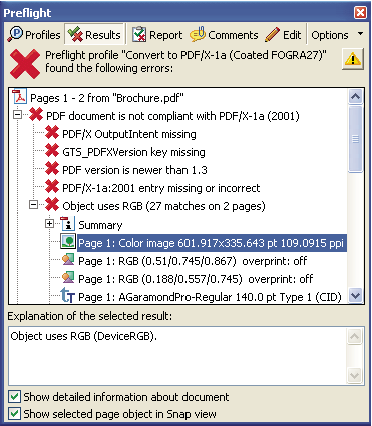
Preflight dialog box with problem objects
The icons at the top of the Preflight dialog box indicate that
at least one issue of a particular severity has been found: the
red error icon  , the
yellow warning icon
, the
yellow warning icon  , and
the blue Info icon
, and
the blue Info icon  for
information only (with no errors or warnings). The green check mark
for
information only (with no errors or warnings). The green check mark  means
that no problems were found.
means
that no problems were found.
Related Information