

TUNGSTEN E2

Warning: A hard reset will erase everything on your device. All your data will be removed, and formats, preferences and other settings are restored to their factory default settings. Don't perform a hard reset unless you've backed up your data, or you're willing to lose everything.

A hard reset does not delete the current date and time. It does restore other settings to the factory default.

HotSync note: Some third-party applications change the way your handheld backs up data. Other third-party applications do not back up data. If you have third-party software on your device, please contact the developer to learn what components are backed up during a HotSync operation, and if HotSync conduits are altered. Any data not backed up will be lost.

  1. Press and hold the power (on/off) button.
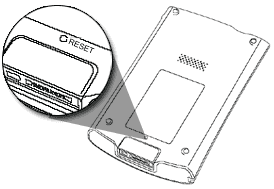
  2. While holding the power button, turn over your device so that you can see the back of it.
  3. Still holding the power button, use an unfolded paper clip or a similar small object, to gently press the RESET hole on the back.
  4. You will see a palmOne logo and a progress bar. Keep holding the power button through this screen.
  5. When the circular Palm Powered logo appears, release the power button.
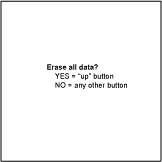
  6. A message will appear warning that you are about to erase all the data stored on your handheld.
  7. Press the UP button to complete the hard reset, erasing everything on your device.
  8. Your handheld will then take you through a series of screens to calibrate the digitizer and verify the time and date.