Import Adobe Illustrator files
Flash can
import Illustrator AI files in version 10 or earlier. If the raster file
in Illustrator is linked, only JPEG, GIF, or PNG is imported with
native format reserved. All other files are converted to PNG format
in Flash. Additionally, conversion
to PNG depends on the version of QuickTime installed.
Note: To import
an Illustrator EPS or Adobe Acrobat PDF file, open the file in Illustrator
CS 3, save it as a CS 3-compatible AI file, and import the resulting
AI file into Flash
Note: The
AI Importer was developed to import AI files created with Illustrator
CS3. While there are no known issues importing AI files created
in earlier versions of Illustrator, we recommend importing AI files
created using Illustrator CS 3. If you encounter issues importing
AI files created in earlier version of Illustrator, open the file in
Illustrator CS 3, and save the AI file as a CS 3 compatible file
and re-import it into Flash.
For
video tutorials, see:
-
Importing Illustrator files: www.adobe.com/go/vid0197
-
Using symbols between Illustrator and Flash: www.adobe.com/go/vid0198
-
Using text between Illustrator and Flash: www.adobe.com/go/vid0199
In
certain instances, you may need to ungroup all the Illustrator objects
on all layers when Flash cannot group
items on import. After all the objects are ungrouped, they can be
manipulated like any other Flash object.
View full size graphic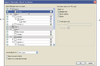
Illustrator AI Importer dialog box
- A.
- Layers panel
- B.
- Import options available for the selected object
Choose from the following options when importing Adobe Illustrator files:
-
Convert layers to Flash layers or keyframes, or single Flash layers.
-
Import text as editable text, vector outlines, or bitmaps.
-
Import as a single bitmap image. Choosing this option imports the AI file as a single bitmap image, and disables the layers list and import options within the AI import dialog box.
Related Information
