Apply filters
Each time you add a new filter to an object, it is added to the list of applied filters for that object in the Property inspector. You can apply multiple filters to an object, as well as remove filters that were previously applied. You can apply filters only to text, button, and movie clip objects.
You can create a filter settings library that lets you easily apply the same filter or sets of filters to an object. Flash stores the filter presets you create in the Property inspector on the Filters tab in the Filters > Presets menu.
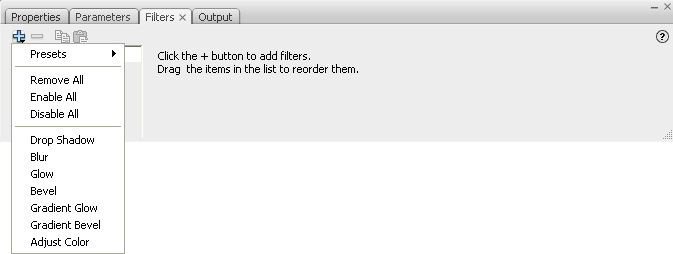
The Add Filter menu in the Property inspector.
 Apply or remove a filter
Copy and paste a filter
- Select the object to copy a filter from, and select the Filters panel.
-
Select the filter to copy, and click the Copy Filter
button
 .
.
-
Select the object to apply the filter to, and click the
Paste Filter button
 .
.
Apply a preset filter to an object
- Select the object to apply a filter preset to, and select the Filter tab.
- Click the Add Filter (+) button, and select Presets.
- Select the filter preset to apply from the list of available presets at the bottom of the preset menu.
Note: When you apply a filter preset to an object, Flash replaces
any filters currently applied to the selected objects with the filters
used in the preset.
Enable or disable a filter applied
to an object
 Click the enable or disable icon next
to the filter name in the Filter list.
Click the enable or disable icon next
to the filter name in the Filter list.
Note: To toggle the enable state of the other filters in the
list, Alt‑click (Windows) or Option-click (Macintosh) the enable
icon in the Filter list. If you Alt‑click the disable icon, the
selected filter is enabled, and all others filters in the list are
disabled.
