View Version Cue information
Note: You can perform this task only if you have
access to the full Version Cue feature set. See Accessing Version Cue features.
You can view information about Version Cue Servers, projects, and assets in the Adobe dialog box or by using the Inspector in Bridge. For help on viewing information in Bridge, see “Inspect Version Cue files” in Bridge Help.
 If you’ve already opened a
Version Cue-managed file in a Version Cue-enabled Creative
Suite component, you can view information about it in the status
bar at the lower-left of the document window (in Acrobat, this information
appears in the lower-left of the navigation pane).
If you’ve already opened a
Version Cue-managed file in a Version Cue-enabled Creative
Suite component, you can view information about it in the status
bar at the lower-left of the document window (in Acrobat, this information
appears in the lower-left of the navigation pane).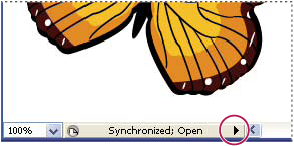
Status bar
-
To change the display of Version Cue
Servers, projects, or files in the dialog box, choose a display
option from View menu
 .
Note: If a Version Cue Server for which you want to view information is outside your subnet, use the Connect To Server command from the Tools menu (or Connect To from the Project Tools menu in Acrobat) to access it.
.
Note: If a Version Cue Server for which you want to view information is outside your subnet, use the Connect To Server command from the Tools menu (or Connect To from the Project Tools menu in Acrobat) to access it. -
To display information about a Version Cue Server,
project, or file, do one of the following:
-
Click the toggle
 to
display the Properties panel and view the properties of a file.
to
display the Properties panel and view the properties of a file. -
Place the pointer over the item. Information appears in a tool tip.
-
Select the file and choose Versions from the Tools or Project Tools (Acrobat) menu to display information about a file’s versions.
-
Related Information
