View, promote, and delete versions
Versions are treated as separate files, which you can access through the Versions dialog box in all Version Cue-enabled Creative Suite components or through the Content panel in Bridge. The Versions dialog box and Bridge display thumbnails of all file versions (numbered sequentially) with comments, dates, and the login name of the user who created the version.
 If you want both a previous version and the current
version to be available for simultaneous use in a project, save
the previous version as a separate asset.
If you want both a previous version and the current
version to be available for simultaneous use in a project, save
the previous version as a separate asset.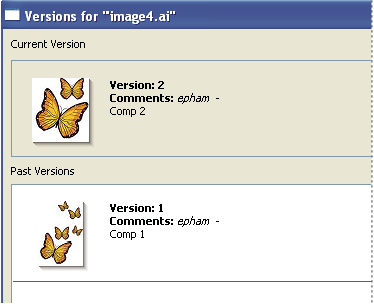
 View versions
-
Choose Versions from the Tools or Project Tools (Acrobat)
menu
 .
.
Versions appear in the Versions dialog box.
You can view versions of a file while
it’s open in a Version Cue-enabled Creative Suite component:
Choose Versions from the status menu at the bottom of the document
window.View versions in Bridge
- Click Version Cue in the Favorites panel.
- Open the project containing the file for which you want to view versions, and select the file.
- Choose Tools > Version Cue > Versions, or click the Versions button in the Content panel. Versions appear in the Content panel.
View a previous version in its
native application
If you view a previous version in its native application, changes you make won’t be reflected in the current version (unless you promote the previous version to be the current version). You can, however, save edits to a previous version as a new asset.
 Do
one of the following:
Do
one of the following:
-
In the Versions dialog box, click the version that you want to open and click View.
-
In Bridge, double-click the version you want to open.
Version Cue opens the previous version in its native application. The version number appears in the file’s title bar to remind you that it is not the current version. The file status is Never Saved, because the previous version is only a snapshot of a previous stage of the file.
Promote a version
Promoting a previous version saves a copy of the previous version as the current version. This process keeps the previous version intact, should you decide to return to it again in the future. Any changes made between its creation and promotion don’t appear in the new current version.
-
Do one of the following:
-
In the Versions dialog box, select the version you want to promote, and click Promote To Current Version.
-
In Bridge, select the version you want to promote, and click Promote.
-
- Type a version comment in the Check In dialog box and click Continue.
Delete a version
Do one of the following:
-
In the Versions dialog box, select the version you want to delete and click Delete.
-
In Bridge, select the version you want to delete, and click Delete This Version.
Note that the remaining versions are not renumbered.
Using Version Cue Server Administration,
you can delete multiple previous versions of all files in a project
simultaneously. By using this method, you can retain past versions
by date or by number of versions to keep. See Advanced Version Cue Server Administration tasks.