About behaviors
Behaviors are predefined scripts that you can attach to objects in your FLA file. Behaviors provide functionality such as frame navigation, loading external SWF and JPEG files, controlling the stacking order of movie clips, and movie clip dragging.
Behaviors provide a convenient way to avoid writing ActionScript and can help you learn how ActionScript works.
Behaviors are available only for ActionScript 2.0 and earlier, and only when you work in the Actions panel, not in an external script file. Typically, you select a triggering object in your document (such as a movie clip or a button), select Add in the Behaviors panel, and then select behavior, as the following example shows:
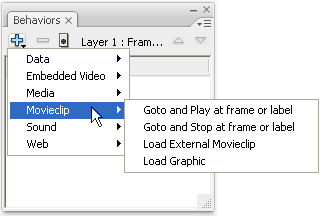
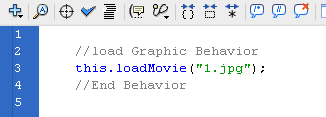
The behavior is added to the object and is displayed in the Actions panel.
For a sample about behaviors, see the Flash Samples page at www.adobe.com/go/learn_fl_samples. Download and decompress the Samples zip file and navigate to the Behaviors\BehaviorsScrapbook folder to access the sample.
