About paths
Whenever you draw a line or shape in Flash, you create a line called a path. A path is made up of one or more straight or curved segments. The beginning and end of each segment are marked by anchor points, which work like pins holding a wire in place. A path can be closed (for example, a circle), or open, with distinct endpoints (for example, a wavy line).
You change the shape of a path by dragging its anchor points, the direction points at the end of direction lines that appear at anchor points, or the path segment itself.
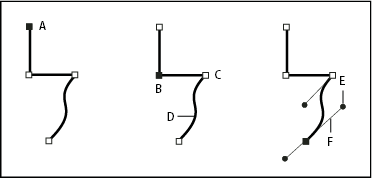
- A.
- Selected (solid) endpoint
- B.
- Selected anchor point
- C.
- Unselected anchor point
- D.
- Curved path segment
- E.
- Direction line
- F.
- Direction point
Paths can have two kinds of anchor points: corner points and smooth points. At a corner point, a path abruptly changes direction. At a smooth point, path segments are connected as a continuous curve. You can draw a path using any combination of corner and smooth points. If you draw the wrong kind of point, you can always change it.
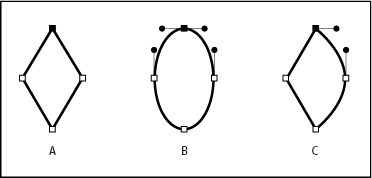
- A.
- Four corner points
- B.
- Four smooth points
- C.
- Combination of corner and smooth points
A corner point can connect any two straight or curved segments, while a smooth point always connects two curved segments.
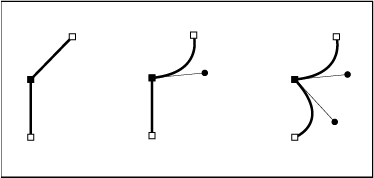
A paths outline is called a stroke. A color or gradient applied to an open or closed paths interior area is called a fill. A stroke can have weight (thickness), color, and a dash pattern. After you create a path or shape, you can change the characteristics of its stroke and fill.
