Using ActionScript 3.0 Components 


Using ActionScript 3.0 Components |
|
|
|
| Using the FLVPlayback Component > Using the FLVPlayback component > Using cue points > Using the Flash Video Cue Points dialog box | |||
|
|||
|
|||
|
|||
Open the Flash Video Cue Points dialog box by double-clicking the Value cell of the cuePoints parameter in the Component inspector. The dialog box looks like the following figure:
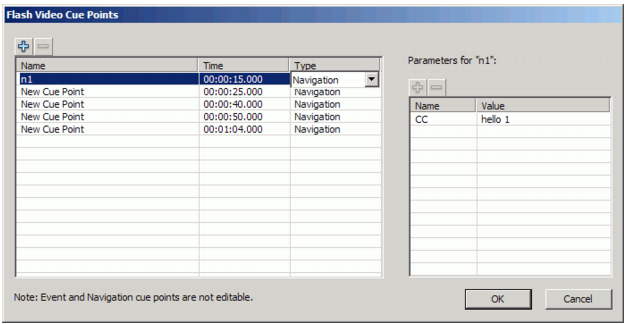
Cue Points dialog box
The dialog box displays embedded and ActionScript cue points. You can use this dialog box to add and delete ActionScript cue points as well as cue point parameters. You can also enable or disable embedded cue points. However, you cannot add, change, or delete embedded cue points.
 To add an ActionScript cue point:
cuePoints parameter in the Component inspector to open the Flash Cue Points dialog box.If multiple cue points exist, the dialog box moves the new cue point to its chronological position in the list.
To delete an ActionScript cue point:cuePoints parameter in the Component inspector to open the Flash Cue Points dialog box.To enable or disable an embedded FLV file cue point:cuePoints parameter in the Component inspector to open the Flash Cue Points dialog box. |
|||
|
|||
|
|||
|
|
|
|