Using ActionScript 3.0 Components 


Using ActionScript 3.0 Components |
|
|
|
| Customizing the UI Components > Customizing the UIScrollBar > Using skins with the UIScrollBar | |||
|
|||
|
|||
|
|||
The UIScrollBar component uses the following skins.
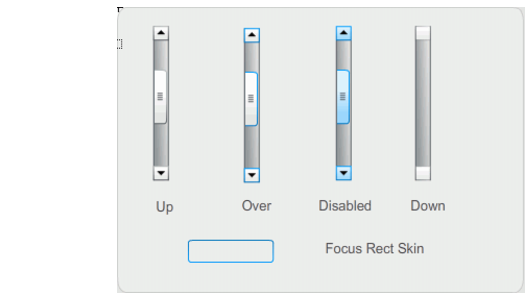
UIScrollBar skins
Both horizontal and vertical scroll bars use the same skins; when displaying a horizontal scroll bar the UIScrollBar component rotates the skins as appropriate.
|
NOTE |
Changing the ScrollBar skin in one component will change it in all other components that use the ScrollBar. |
The following example demonstrates how to change the color of the UIScrollBar's thumb and
arrow buttons.
 To change the color of UIScrollBar skins:
var tf:TextField = new TextField();addChild(tf);tf.x = 150;tf.y = 100;mySb.width = tf.width = 200;tf.height = 22;tf.text = "All work and no play makes Jack a dull boy. All work and no play makes Jack a dull boy. All . . .";mySb.y = tf.y + tf.height;mySb.x = tf.x + tf.width;xmySb.scrollTarget = tf;
The UIScrollBar component should appear as it does in the following illustration.
|
|||
|
|||
|
|||
|
|
|
|