Using ActionScript 3.0 Components 


Using ActionScript 3.0 Components |
|
|
|
| Working with Components > Component architecture > ActionScript 3.0 FLA-based components | |||
|
|||
|
|||
|
|||
The ActionScript 3.0 User Interface components are FLA-based (.fla) files with built-in skins that you can access for editing by double-clicking the component on the Stage. The component's skins and other assets are placed on Frame 2 of the Timeline. When you double-click the component, Flash automatically jumps to Frame 2 and opens a palette of the component's skins. The following illustration shows the palette of skins that display for the Button component.
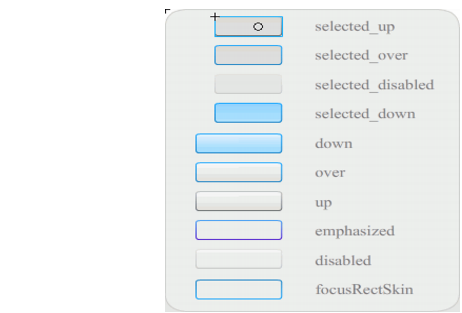
Skins for the Button component
For more information on component skins and customizing components, see Customizing the UI Components and Customizing the FLVPlayback component.
To speed up compilation for your applications and to avoid conflicts with your ActionScript 3.0 settings, the Flash CS3 FLA-based UI components also contain a SWC that contains the component's already-compiled ActionScript code. The ComponentShim SWC is placed on Stage on Frame 2 in every User Interface component to make available the precompiled definitions. To be available for ActionScript, a component must either be on Stage or be in the library with the Export In First Frame option selected in its Linkage properties. To create a component using ActionScript, you also must import the class with an import statement to access it. For information on the import statement, see the ActionScript 3.0 Language and Components Reference.
|
|||
|
|||
|
|||
|
|
|
|