Using ActionScript 2.0 Components 


Using ActionScript 2.0 Components |
|
|
|
| Creating Components > Creating the ActionScript class file > Adding component metadata > About the Inspectable tag | |||
|
|||
|
|||
|
|||
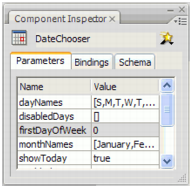
You use the Inspectable tag to specify the user-editable (inspectable) parameters that appear in the Component inspector and Property inspector. This lets you maintain the inspectable properties and the underlying ActionScript code in the same place. To see the component properties, drag an instance of the component onto the Stage and select the Parameters tab of the Component inspector.
Collection parameters are also inspectable. For more information, see About the Collection tag.
The following figure shows the Parameters tab of the Component inspector for the DateChooser component:
Alternatively, you can view a subset of the component properties on the Property inspector Parameters tab.
When determining which parameters to reveal in the authoring environment, Flash uses the Inspectable tag. The syntax for this tag is as follows:
[Inspectable(value_type=value[,attribute=value,...])]property_declarationname:type;
The following example defines the enabled parameter as inspectable:
[Inspectable(defaultValue=true, verbose=1, category="Other")]
var enabled:Boolean;
The Inspectable tag also supports loosely typed attributes like this:
[Inspectable("danger", 1, true, maybe)]
The metadata statement must immediately precede the property's variable declaration in order to be bound to that property.
The following table describes the attributes of the Inspectable tag:
|
Attribute |
Type |
Description |
|---|---|---|
|
|
String or Number |
(Optional) A default value for the inspectable property. |
|
|
String |
(Optional) Specifies a comma-delimited list of legal values for the property. |
|
|
Number |
(Optional) Added for backward compatibility with Flash MX components. Used as the default index into a List value. |
|
|
String |
(Optional) A display name for the property. For example, Font Width. If not specified, use the property's name, such as |
|
|
String |
(Optional) A type specifier. If omitted, use the property's type. The following values are acceptable:
|
|
|
String |
(Optional) Added for backward compatibility with Flash MX components. Specifies the variable that this parameter is bound to. |
|
|
Number |
(Optional) An inspectable property that has the verbose attribute set to 1 does not appear in the Property inspector but does appear in the Component inspector. This is typically used for properties that are not modified frequently. |
None of these attributes are required; you can use Inspectable as the metadata tag.
All properties of the superclass that are marked Inspectable are automatically inspectable in the current class. Use the InspectableList tag if you want to hide some of these properties for the current class.
|
|||
|
|||
|
|||
|
|
|
|