Learning ActionScript 2.0 in Adobe Flash 


Learning ActionScript 2.0 in Adobe Flash |
|
|
|
| Handling Events > About ActionScript and events | |||
|
|||
|
|||
|
|||
In Flash, ActionScript code is executed when an event occurs: for example, when a movie clip is loaded, when a keyframe on the timeline is entered, or when the user clicks a button. Events can be triggered either by the user or by the system. Users click mouse buttons and press keys; the system triggers events when specific conditions are met or processes completed (the SWF file loads, the timeline reaches a certain frame, a graphic finishes downloading, and so on).
When an event occurs, you write an event handler to respond to the event with an action. Understanding when and where events occur will help you to determine how and where you will respond to the event with an action, and which ActionScript tools to use in each case.
Events can be grouped into a number of categories: mouse and keyboard events, which occur when a user interacts with your Flash application through the mouse and keyboard; clip events, which occur within movie clips; and frame events, which occur within frames on the timeline.
A user interacting with your SWF file or application triggers mouse and keyboard events. For example, when the user rolls over a button, the Button.onRollOver or on(rollOver) event occurs; when the user clicks a button, the Button.onRelease event occurs; if a key on the keyboard is pressed, the on(keyPress) event occurs. You can write code on a frame or attach scripts to an instance to handle these events and add all the interactivity you desire.
Within a movie clip, you may react to a number of clip events that are triggered when the user enters or exits the scene or interacts with the scene by using the mouse or keyboard. You might, for example, load an external SWF file or JPG image into the movie clip when the user enters the scene, or allow the user's mouse movements to reposition elements in the scene.
On a main or movie clip timeline, a system event occurs when the playhead enters a keyframe--this is known as a frame event. Frame events are useful for triggering actions based on the passage of time (moving through the timeline) or for interacting with elements that are currently visible on the Stage. When you add a script to a keyframe, it is executed when the keyframe is reached during playback. A script attached to a frame is called a frame script.
One of the most common uses of frame scripts is to stop the playback when a certain keyframe is reached. This is done with the stop() function. You select a keyframe and then add the stop() function as a script element in the Actions panel.
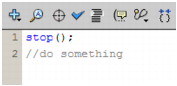
When you've stopped the SWF file at a certain keyframe, you need to take some action. You could, for example, use a frame script to dynamically update the value of a label, to manage the interaction of elements on the Stage, and so on.
|
|||
|
|||
|
|||
|
|
|
|