Learning Flash Lite 1.x ActionScript 


Learning Flash Lite 1.x ActionScript |
|
||
| Common Scripting Tasks > Loading external data | |||
|
|||
|
|||
|
|||
To load external data into a Flash Lite application, you use the loadVariables() function. You can load data over the network (from an HTTP address) or from the local file system. This feature is available only in Flash Lite 1.1 and later.
This section demonstrates how to use the loadVariables() function to load data from an external file and display that data in dynamic text fields. First you'll create the data file, a text file that contains five name-value pairs separated by ampersand (&) symbols. Then you'll create the Flash Lite application that loads and displays the data contained in the text file.
This example assumes that the data file and the SWF are both located in the same folder, either on your computer (when you test in the emulator) or on the device's memory card (when you test on an actual device). To test the application on the device, you must do one of the following:
loadVariables() call in the sample application to point to that URL, as follows:
loadVariables("http://www.your-server.com/data.txt", "data_clip");
For an example of an application that loads data over the network, see the "Flash Lite news reader" in Flash Samples.
 To create the data file:
item_1=Hello&item_2=Bonjour&item_3=Hola&item_4=Buon+giorno&item_5=G'day
To create the Flash Lite application to load the data:For more information about using Flash Lite document templates, see Using Flash Lite document templates in Getting Started with Flash Lite 1.x.
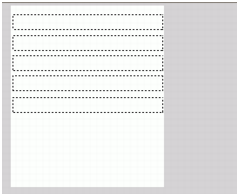
item_1 in the Var text box.
This variable name corresponds to the name of the first variable defined in the data.txt file you created previously (item_1=Hello).
item_2, item_3, item_4, and item_5.
loadVariables("data.txt", "data_clip");
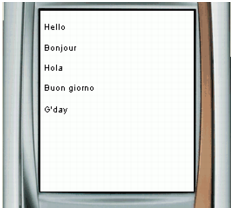
You should see each text field populated with the data in the text file, as the following figure shows:
|
|||
|
|||
|
|||
|
|
||