Developing Flash Lite 1.x Applications 


Developing Flash Lite 1.x Applications |
|
|
|
| Testing Flash Lite Content > Using the emulator > Interacting with the emulator | |||
|
|||
|
|||
|
|||
You can use your computer mouse or use keyboard shortcuts to interact with the emulator's keypad. You can interact with the following keys on the emulator's keypad:
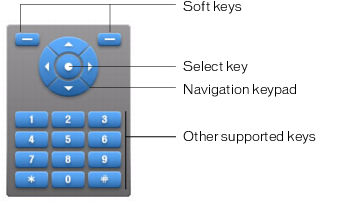
You can use your mouse to click the emulator's keypad directly, or you can use the following equivalent keyboard shortcuts:
For additional details about interacting with the emulator to test your application, see the Adobe Device Central online help.
|
|||
|
|||
|
|||
|
|
|
|