

beginGradientFill (MovieClip.beginGradientFill method)
public beginGradientFill(fillType:String, colors:Array, alphas:Array, ratios:Array, matrix:Object) : Void
Indicates the beginning of a new drawing path. If the first parameter is undefined, or if no parameters are passed, the path has no fill. If an open path exists (that is if the current drawing position does not equal the previous position specified in a MovieClip.moveTo() method), and it has a fill associated with it, that path is closed with a line and then filled. This is similar to what happens when you call MovieClip.endFill().
This method fails if any of the following conditions exist:
- The number of items in the colors, alphas, and ratios parameters are not equal.
- The fillType parameter is not "linear" or "radial".
- Any of the fields in the object for the matrix parameter are missing or invalid.
You can extend the methods and event handlers of the MovieClip class by creating a subclass.
fillType:String - Either the string "linear" or the string "radial".
colors:Array - An array of RGB hex color values to be used in the gradient (for example, red is 0xFF0000, blue is 0x0000FF, and so on).
alphas:Array - An array of alpha values for the corresponding colors in the colors array; valid values are 0-100. If the value is less than 0, Flash uses 0. If the value is greater than 100, Flash uses 100.
ratios:Array - An array of color distribution ratios; valid values are 0-255. This value defines the percentage of the width where the color is sampled at 100 percent.
matrix:Object - A transformation matrix that is an object with either of the following two sets of properties:
- a, b, c, d, e, f, g, h, i, which can be used to describe a 3 x 3 matrix of the following form:
    a b c
    d e f
    g h i
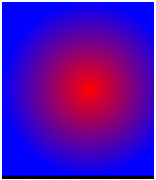
The following example uses the beginGradientFill() method with a matrix parameter of this type:
//import flash.geom.*

this.createEmptyMovieClip("gradient_mc", this.getNextHighestDepth());

gradient_mc._x = -100;
gradient_mc._y = -100;

with (gradient_mc)
{
    colors = [0xFF0000, 0x0000FF];
    fillType = "radial"
    alphas = [100, 100];
    ratios = [0, 0xFF];
    matrix = {a:200, b:0, c:0, d:0, e:200, f:0, g:200, h:200, i:1};
    beginGradientFill(fillType, colors, alphas, ratios, matrix);
    moveTo(100, 100);
    lineTo(100, 300);
    lineTo(300, 300);
    lineTo(300, 100);
    lineTo(100, 100);
    endFill();
}
This code draws the following image on the screen:
- matrixType, x, y, w, h, r.
The properties indicate the following: matrixType is the string "box", x is the horizontal position relative to the registration point of the parent clip for the upper-left corner of the gradient, y is the vertical position relative to the registration point of the parent clip for the upper-left corner of the gradient, w is the width of the gradient, h is the height of the gradient, and r is the rotation in radians of the gradient.
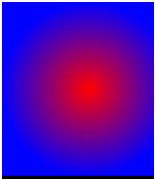
The following example uses the beginGradientFill() method with a matrix parameter of this type:
//import flash.geom.*

this.createEmptyMovieClip("gradient_mc", this.getNextHighestDepth());

gradient_mc._x = -100;
gradient_mc._y = -100;

with (gradient_mc)
{
    colors = [0xFF0000, 0x0000FF];
    fillType = "radial"
    alphas = [100, 100];
    ratios = [0, 0xFF];
    matrix = {matrixType:"box", x:100, y:100, w:200, h:200,
        r:(45/180)*Math.PI};
    beginGradientFill(fillType, colors, alphas, ratios, matrix);
    moveTo(100, 100);
    lineTo(100, 300);
    lineTo(300, 300);
    lineTo(300, 100);
    lineTo(100, 100);
    endFill();
}
This code draws the following image on the screen:
beginFill (MovieClip.beginFill method), endFill (MovieClip.endFill method), lineStyle (MovieClip.lineStyle method), lineTo (MovieClip.lineTo method), moveTo (MovieClip.moveTo method)