

Hello World Flash Lite application
This simple tutorial introduces you to the mobile authoring and testing features in Adobe Flash CS3 Professional, as well as the general workflow for creating content using Flash Lite. In this section, you create a simple Flash Lite application and test it in the Adobe Device Central CS3 emulator. For a more complete sample application, see "Tutorial: Creating a Flash Lite application".
For the purposes of this tutorial, assume that you're developing content for the Flash Lite stand-alone player. The procedure targets a generic device.
First, decide which devices and Flash Lite content type you are targeting.
Configure and create a simple Flash Lite application
- Start Flash.
- On the main Flash screen, select Create New > Flash File (Mobile). Flash opens Adobe Device Central and displays the New Document tab.
- On the New Document tab, select Flash Lite 2.0 in the Player Version box, ActionScript™ 2.0 in the ActionScript Version box, and Standalone Player in the Content Type box.
- Click Custom Size for All Selected Devices at the bottom of the screen. This allows you to create content for the stand-alone Flash Lite player.
- Click Create. You are returned to Flash, which creates a new document with preset publish settings and (when you specify a device) the correct size for the device you selected.
- In the Tools panel, select the Text tool and drag to create a text box on the Stage.
Type Hello, world! (or other text) in the text box.
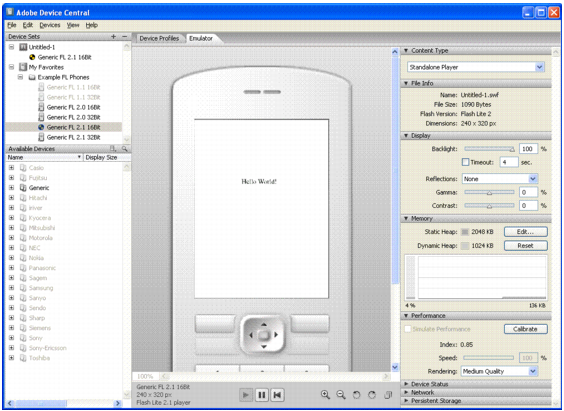
- Select Control > Test Movie to export your application to Adobe Device Central and view your application in the Adobe Device Central emulator.
NOTE
During testing in Device Central, you can change the device and content type to see your application on a different platform. To do this, double-click a device in the Available Devices panel and select a new content type from Content Type. When you return to Flash, Flash remembers the settings you last used in the emulator.
- To return to Flash, select File > Return to Flash.