

Specifying types of input text fields
Flash Lite supports single line, multiline, and password input text fields. You specify an input text field's type by using the Line Type pop-up menu in the Property inspector, as the following image shows:
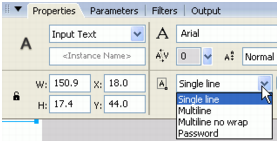
The line type that you specify for an input text field determines the behavior of the device's input text dialog box when a user edits the text field.
For example, when a user edits a single line input text field, the device's input text dialog box shows a single line input text box. The input text box scrolls horizontally if the user enters more characters than can be displayed.