

Input mode indicator
To assist users with common text input tasks, most devices provide several input modes, such as predictive or manual (triple tap or multi tap) text entry, or all number-only modes.
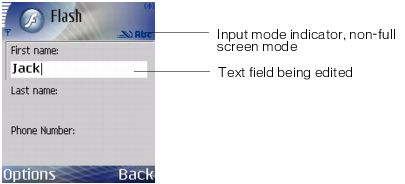
When Flash Lite is running in full screen mode, the device displays a letter A for alpha input mode and a number sign (#) for numeric input mode. When Flash Lite is not running in full screen mode, the device could draw an input mode indicator on a status bar or some other location on the display. For example, the following image shows the input mode indicator in non-full screen mode on the Series 60 stand-alone version of Flash Lite 2.1:
When the player is running in full-screen mode, the device may draw an input mode indicator to a location of its choice on the display. For example, the following figure shows the input mode indicator in full screen mode on the Series 60 stand-alone version of Flash Lite 2.1:
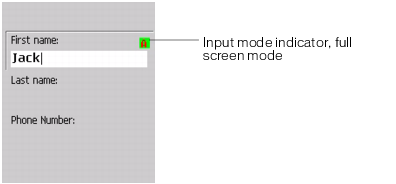
The input mode indicator for full screen applications shown in the previous figure is a reference implementation for the stand-alone Series 60 player. The specific indicator, if any, that appears is determined by the device.