ActionScript 2.0 Components Language Reference 


ActionScript 2.0 Components Language Reference |
|
|
|
| FLVPlayback Component > Using the FLVPlayback component > Specifying the contentPath parameter | |||
|
|||
|
|||
|
|||
The contentPath parameter lets you specify the name and location of the FLV file, both of which inform Flash how to play the file.
Open the Content Path dialog box by double-clicking the Value cell for the contentPath parameter in the Component inspector. The dialog box looks like the following figure:
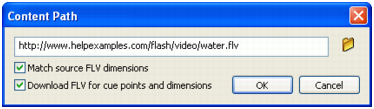
The dialog box provides two check boxes that can determine the dimensions of the FLVPlayback instance and specify whether to acquire the dimensions and cue point information from the FLV file. For more information, see The FLV file options.
|
|||
|
|||
|
|||
|
|
|
|