ActionScript 2.0 Language Reference 


ActionScript 2.0 Language Reference |
|
|
|
| ActionScript classes > GradientGlowFilter (flash.filters.GradientGlowFilter) > ratios (GradientGlowFilter.ratios property) | |||
|
|||
|
|||
|
|||
public ratios : Array
An array of color distribution ratios for the corresponding colors in the colors array. Valid values are 0 to 255.
The ratios property cannot be changed by directly modifying its values. Instead, you must get a reference to ratios, make the change to the reference, and then set ratios to the reference.
The colors, alphas, and ratios properties are all related. The first element in the colors array corresponds to the first element in the alphas array and in the ratios array, and so on.
Think of the gradient glow filter as a glow that emanates from the center of the object (if the distance value is set to 0), with gradients that are stripes of color blending into each other. The first color in the colors array is the outermost color of the glow. The last color is the innermost color of the glow.
Each value in the ratios array sets the position of the color on the radius of the gradient, where 0 represents the outermost point of the gradient and 255 represents the innermost point of the gradient. The ratio values can range from 0 to 255 pixels, in increasing value; for example [0, 64, 128, 200, 255]. Values from 0 to 128 appear on the outer edges of the glow. Values from 129 to 255 appear in the inner area of the glow. Depending on the ratio values of the colors and the type value of the filter, the filter colors might be obscured by the object to which the filter is applied.
In the following code and image, a filter is applied to a black circle movie clip, with the type set to "full". For instructional purposes, the first color in the colors array, pink, has an alpha value of 1, so it shows against the white document background. (In practice, you probably would not want the first color showing in this way.) Note the last color in the array, yellow, obscures the black circle to which the filter is applied:
var colors = [0xFFCCFF, 0x0000FF, 0x9900FF, 0xFF0000, 0xFFFF00];
 var alphas = [1, 1, 1, 1, 1];
 var ratios = [0, 32, 64, 128, 225];
 var myGGF = new GradientGlowFilter(0, 0, colors, alphas, ratios, 50, 50, 1, 2, "full", false);
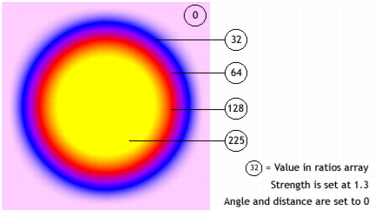
To achieve a seamless effect with your document background when you set the type value to "outer" or "full", set the first color in the array to the same color as the document background, or set the alpha value of the first color to 0; either technique makes the filter blend in with the background.
If you make two small changes in the code, the effect of the glow can be very different, even with the same ratios and colors arrays. Set the alpha value of the first color in the array to 0, to make the filter blend in with the document's white background; and set the type property to "outer" or "inner". Observe the results, as shown in the following images.
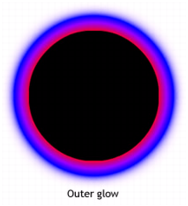
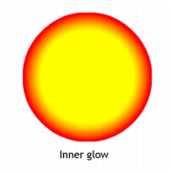
Keep in mind that the spread of the colors in the gradient varies based on the values of the blurX, blurY, strength, and quality properties, as well as the ratios values.
Availability: ActionScript 1.0; Flash Player 8
The following example changes the ratios property on an existing movie clip when a user clicks it.
import flash.filters.GradientGlowFilter;
var mc:MovieClip = createGradientGlowRectangle("GlowRatios");
mc.onRelease = function() {
    var filter:GradientGlowFilter = this.filters[0];
    var ratios:Array = filter.ratios;
    ratios.shift();
    ratios.unshift(40);
    filter.ratios = ratios;
    this.filters = new Array(filter);
}

function createGradientGlowRectangle(name:String):MovieClip {
    var art:MovieClip = this.createEmptyMovieClip(name, this.getNextHighestDepth());
    var w:Number = 100;
    var h:Number = 100;
    art.beginFill(0x003366);
    art.lineTo(w, 0);
    art.lineTo(w, h);
    art.lineTo(0, h);
    art.lineTo(0, 0);
    art._x = 20;
    art._y = 20;

    var colors:Array = [0xFFFFFF, 0xFF0000, 0xFFFF00, 0x00CCFF];
    var alphas:Array = [0, 1, 1, 1];
    var ratios:Array = [0, 63, 126, 255];
    var filter:GradientGlowFilter = new GradientGlowFilter(0, 45, colors, alphas, ratios, 55, 55, 2.5, 2, "outer", false);
    var filterArray:Array = new Array();
    filterArray.push(filter);
    art.filters = filterArray;
    return art;
}
colors (GradientGlowFilter.colors property), alphas (GradientGlowFilter.alphas property), beginGradientFill (MovieClip.beginGradientFill method)
|
|||
|
|||
|
|||
|
|
|
|