ActionScript 2.0 Language Reference 


ActionScript 2.0 Language Reference |
|
|
|
| ActionScript classes > GradientBevelFilter (flash.filters.GradientBevelFilter) > ratios (GradientBevelFilter.ratios property) | |||
|
|||
|
|||
|
|||
public ratios : Array
An array of color distribution ratios for the corresponding colors in the colors array. Valid values for each element in the array are 0 to 255.
The ratios property cannot be changed by directly modifying its values. Instead, you must get a reference to ratios, make the change to the reference, and then set ratios to the reference.
The colors, alphas, and ratios properties are all related. The first element in the colors array corresponds to the first element in the alphas array and in the ratios array, and so on.
To understand how the colors in a gradient bevel are distributed, think first of the colors that you want in your gradient bevel. Consider that a simple bevel has a highlight color and shadow color; a gradient bevel has a highlight gradient and a shadow gradient. Assume that the highlight appears on the top-left corner, and the shadow appears on the bottom-right corner. Assume that one possible usage of the filter has four colors in the highlight and four in the shadow. In addition to the highlight and shadow, the filter uses a base fill color that appears where the edges of the highlight and shadow meet. Therefore the total number of colors is nine, and the corresponding number of elements in the ratios array is nine.
If you think of a gradient as composed of stripes of various colors, blending into each other, each ratio value sets the position of the color on the radius of the gradient, where 0 represents the outermost point of the gradient and 255 represents the innermost point of the gradient. For a typical usage, the middle value is 128, and that is the base fill value. To get the bevel effect shown in the image below, assign the ratio values as follows, using the example of nine colors:
If you want an equal distribution of colors for each edge, use an odd number of colors, where the middle color is the base fill. Distribute the values between 0-127 and 129-255 equally among your colors, then adjust the value to change the width of each stripe of color in the gradient. For a gradient bevel with nine colors, a possible array is [16, 32, 64, 96, 128, 160, 192, 224, 235]. The following image depicts the gradient bevel as described:
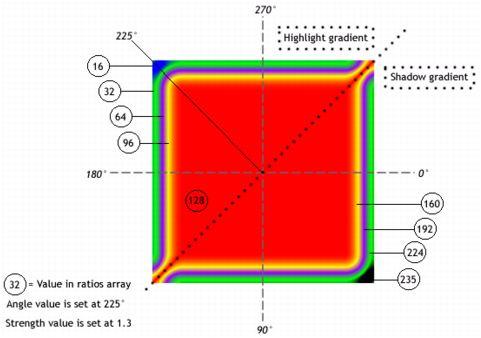
Keep in mind that the spread of the colors in the gradient varies based on the values of the blurX, blurY, strength, and quality properties, as well as the ratios values.
Availability: ActionScript 1.0; Flash Player 8
The following example demonstrates how to set the ratios property on an existing entity.
import flash.filters.GradientBevelFilter;

var mc:MovieClip = setUpFilter("ratiosExample");
mc.onPress = function() {
    var arr:Array = this.filters;
    var ratios:Array = [127, 128, 129];
    arr[0].ratios = ratios;
    this.filters = arr;
}
mc.onRelease = function() {
    var arr:Array = this.filters;
    var ratios:Array = [0, 128, 255];
    arr[0].ratios = ratios;
    this.filters = arr;
}

function setUpFilter(name:String):MovieClip {
    var art:MovieClip = this.createEmptyMovieClip(name, this.getNextHighestDepth());
    var w:Number = 150;
    var h:Number = 150;
    art.beginFill(0xCCCCCC);
    art.lineTo(w, 0);
    art.lineTo(w, h);
    art.lineTo(0, h);
    art.lineTo(0, 0);

    var colors:Array = [0xFFFFFF, 0xCCCCCC, 0x000000];
    var alphas:Array = [1, 0, 1];
    var ratios:Array = [0, 128, 255];
    var filter:GradientBevelFilter = new GradientBevelFilter(5, 225, colors, alphas, ratios, 5, 5, 5, 2, "inner", false);

    art.filters = new Array(filter);
    return art;
}
alphas (GradientBevelFilter.alphas property), colors (GradientBevelFilter.colors property), beginGradientFill (MovieClip.beginGradientFill method)
|
|||
|
|||
|
|||
|
|
|
|