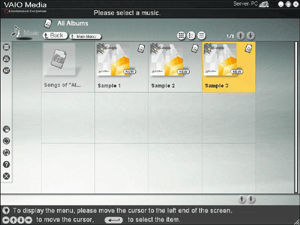
Folders containing tracks are displayed in this screen. Select the folder that contains the tracks that you would like to hear.
To Select a Folder
Display and select folders as follows.
- To display the folders in a folder, click the folder. To return to the previous list, click the Back button.
- Click
 or
or  to scroll through the contents of folders on each screen.
- When you click the folder name, the tracks appear. They are played back starting from the first track in the folder.

Hint
Folders containing audio files are handled as virtual albums, and displayed as such in the list. Folders that do not contain any audio files are grayed and cannot be selected.
Searching for Tracks
You can narrow your search for tracks by specifying details about them, such as their category. For details, refer to
Advanced Search.
Changing the List Display Method
You can change the folder display method with the following buttons.
 |
Display thumbnails (cover images). |
 |
Display item names with thumbnails. |
 |
Display item names only. |
Some servers may not display thumbnails.
Hint
You can sort the folders in the list according to categories such as names or dates. Display the menu on the left edge of the screen with your mouse, keyboard, or remote control, and select Sort on the menu. Depending on the server, you may not be able to change the display order.
Returning to the Previous Screen
You can return to the previous screen by clicking the Back button. When the first screen in the list is displayed, clicking the Back button allows you to return to the VAIO Media main menu.
Hints
- If there are other servers that you would like to connect to, display the menu on the left edge of the screen with your mouse, keyboard, or remote control. Choose Select Server to display the "Please select a server" screen. You are now able to select a different server.
- You can return to the main menu by clicking Main Menu.
- If you display the menu on the left edge of the screen with your mouse, keyboard, or remote control and select Recent Playback on the menu, you can select the following:
- Back (Allows you to close the menu.)
- Recent Music (Allows you to play back the tracks in the last folder accessed.)
- Recent Photo (Allows you to display the folder containing the last photos accessed.)
- Recent Video (Allows you to play back the last video accessed.)
- Recent TV (Allows you to watch the last television channel accessed. This item may not be available in some countries or regions.)


 Selecting a Folder Containing Tracks