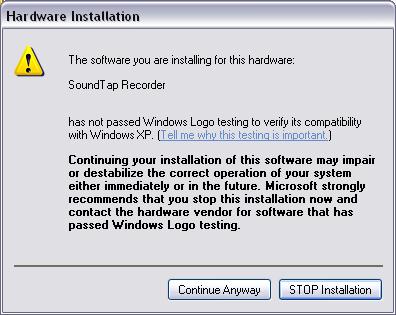
Depending on your computer's settings, you may have been presented with the following screen during the SoundTap installation.
It is safe for you to click Continue Anyway at this point. If you choose to not install the SoundTap driver, then SoundTap will not be functional.
If you chose to not install the driver, but would like to do so now, simply rerun the installation.
If you have followed the installation steps successfully, your computer will now have a new sound device called SoundTap Recorder. Most of your computer's sound devices will be physical devices such as sound cards that you plug into your computer. The SoundTap Recorder is different, it is a virtual sound device. It is simply a piece of software that acts like a physical device.
When you start the SoundTap application, your default sound playback device will be changed to the SoundTap Recorder. When you shutdown SoundTap, your default sound playback device will be changed back to the previous selection.
If your computer should start experiencing troubles with its sound, it may be necessary to manually change your default sound playback device to your normal physical sound card. To do this: