You can use any of several QuickBooks methods to improve cash flow.
Encouraging your customers to pay you sooner rather than later is appealing for obvious reasons. But did you know that cash flow may improve when you get paid faster?
Cash flow - the lag time between cash outflows and the receipt of incoming cash - is a critical factor in business success. In fact, poor cash flow management is a common reason for new business failures. Accelerating cash inflows can improve cash flow by closing the gap between the date bills are due and the date of sale.
An example helps illustrate this point. A small clothing boutique places an order for its fall line in May. 25% is due when the order is placed, and the balance is due 30 days following receipt of the order. The store must pay for the entire line before it can sell enough clothing to make up the cost.
When autumn arrives, the store places an order for spring. It also extends special credit terms during its Labor Day sale. This causes a delay of cash inflows, making it difficult to cover current obligations. The store manager should pay special attention to collecting payments quickly in order to cover the gap between cash outflows and cash inflows.
QuickBooks has three features expressly designed to help you improve cash flow. You can learn about each by clicking on the Manage Your Receivables, Bill & Get Paid Online, and Accept Credit Cards buttons above. To learn how these features support and complement one another, click on Learn More.
|
Manage Your Receivables
If you carry accounts receivable, you can improve cash flow by managing your accounts effectively. Effective A/R management begins with the establishment of a credit policy. A written credit policy helps you clarify when and to whom you are willing to extend credit. It also establishes a credit agreement between you and the customer. You can use the Manage Your Receivables tool to build a credit policy.
Manage Your Receivables also provides tips on how to best use, analyze, and act on the information in Accounts Receivable reports. With the Average Collections Period calculator, you can determine whether slow collections are adversely affecting your cash flow. If they are, you'll learn what you need to do to make your billing and collections efforts more effective.
Sometimes, difficult customers can thwart even your best efforts at receivables management. Manage Your Receivables also advises you on when to use a collections agency and how to select one.
|
|
Bill and Get Paid Online
One way to improve cash flow is to bill more quickly. By faxing or e-mailing invoices and statements, you can bill customers right after the sale. They receive the invoice or statement within seconds rather than days, and you save time you'd otherwise spend printing them and sending them through the mail.
People often respond more quickly to e-mail and fax than to paper mail, increasing the likelihood that you'll be paid promptly. Sending invoices and statements online also gives you an opportunity to raise and resolve questions or problems quickly.
You can e-mail invoices, statements, and estimates without charge from within QuickBooks. QuickBooks also offers a service that enables you to fax your business forms as you create them. Best of all, QuickBooks now has a way for your customers to pay you online! Once you register for QuickBooks Online Billing, the invoices and statements that you e-mail can include a link to the online payment service. This link takes your customers to a secure Web site that enables them to pay you online.
|
|
Accept Credit Cards
Accepting credit cards does more than just provide your customers with a convenient way to pay. It can also reduce or eliminate billing hassles and costs, and save you several trips to the bank.
With the QuickBooks Merchant Account Service you can enter credit card payments directly in QuickBooks and have the credit card authorized online. The payment is then automatically deposited into your bank account and recorded in QuickBooks, making duplicate data entry a thing of the past. You can also store customer's credit card information in QuickBooks in a secure, encrypted format, saving you the hassle of re-entering the same data repeatedly.
The QuickBooks Merchant Account Service can be used with QuickBooks Online Billing. Use QBOB to send invoices, statements, and estimates to your customer electronically. Then, when they pay you online, use the QuickBooks Merchant Account Service to collect and process their payment.
|
|
Learn More
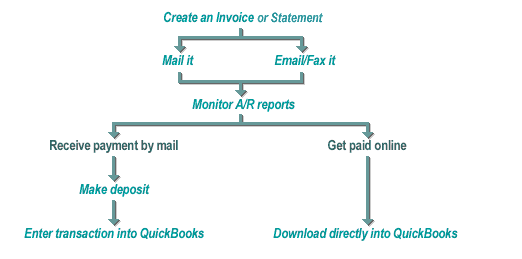
Used together, the features just described represent a powerful way to improve cash flow. They make it easy for customers to pay you and even easier for you to manage. Here's how the tools and services can be used in conjunction with one another for maximum benefit.
|
|