| Make a disc label |
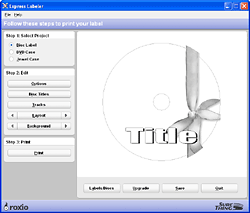
A wide range of predefined layouts
are available. (Your version of the labeler may not be the same as the
one pictured above.) |
The disc label
project on the Tools tab opens an application you can use to make professional-looking
labels, inserts, sleeves, and disc case covers.
|
- Some versions of the project launcher do not include
labeling software.
- Many types of label and cover stock are available at
office supply and computer retail stores. Label and cover stock can
also be purchased at www.roxio.com.
- The labeling software comes with a wide range of background
images. You can also use your own images as label backgrounds. If you
have a scanner, you can even scan images and import them directly into
a project
|
To create a label:
- Click on the Tools project tab and select
a disc label project. The labeler will open, and Roxio Home will be
minimized on the Windows taskbar.
- Select a project..
- Edit the label. Choose the wording, track infomation,
layout, and background.
- Print the label.
|






