



|
|
|
|
|
| Erase a disc | |||||
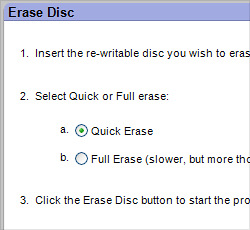
The Erase Disc project window. |
Some discs can be erased. These discs are called rewritable and can usually be identified by their format name. For example, CD-RW, DVD-RW, DVD+RW, and BD-RE discs can all be erased. DVD-RAM discs can also be erased. Some projects require a blank or erasable disc. You can erase a rewriteable disc whenever you wish by using the Erase Disc project located on the Tools tab. |
||||
| Tips | |||||
|
What's the difference between Quick Erase and Full Erase?
|
|||||
| Step-by-step | |||||
To erase a rewritable disc:
|
|||||
 |
 |
 |
 |
 |
© 2000-2006 Sonic Solutions. All Rights Reserved. |