Previous topic Return to topic list Next topic
Get disc information
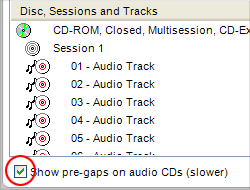
The Show pre-gaps checkbox
The Show pre-gaps checkbox.

Understanding all the new disc formats can be a challenge. Each offers its own benefits. Each has a set of compatibility issues that may affect how you can use the disc.

The Disc Information project assembles information about your disc drive, the disc in the drive, and the data on the disc. The information is displayed in the project window.


Tips

  • The Disc Information project window displays pre-gaps for audio discs if the Show pre-gaps on audio CDs checkbox is selected. The checkbox is located at the bottom of the Disc Information project window. Selecting this option may slow the display of your disc information. (A pre-gap is the period of silence that typically occurs between each track on an audio CD.)
Step-by-step

To get information about a disc:
  1. Insert a disc into your disc drive.
  2. Select the drive from the Destination Selection drop-down menu.
  3. Click on the Tools tab.
  4. Click on the Disc Information project name.

Previous topic Return to topic list Next topic

© 2000-2006 Sonic Solutions. All Rights Reserved.

www.roxio.com