

Channel Mixer effect
The Channel Mixer effect modifies a color channel by using a mix of the current color channels. Use this effect to make creative color adjustments not easily done with the other color adjustment tools: Create high-quality grayscale images by choosing the percentage contribution from each color channel, create high-quality sepia-tone or other tinted images, and swap or duplicate channels.
- [output channel]-[input channel]
- The percentage of the input channel value to add to the output channel value. For example, a Red-Green setting of 10 increases the value of the red channel for each pixel by 10% of the value of the green channel for that pixel. A Blue-Green setting of 100 and a Blue-Blue setting of 0 replaces the blue channel values with the green channel values.
- [output channel]-Const
- The constant value (as a percentage) to add to the output channel value. For example, a Red-Const setting of 100 saturates the red channel for every pixel by adding 100% red.
- Monochrome
- Uses the value of the red output channel for the red, green, and blue output channels, creating a grayscale image.
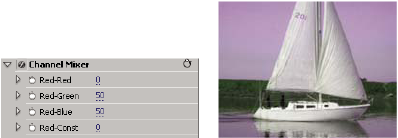
Removing all Red input from the Red channel, and adding 50%
of the Green channel and 50% of the Blue channel to the Red channel