

Noise HLS and Noise HLS Auto effects
The Noise HLS effect generates static noise in clips that use still or moving source footage. The Noise HLS Auto effect automatically creates animated noise. Both effects offer various types of noise that can be added to the hue, saturation, or lightness of a clip. Controls for these effects are the same except for the final control that determines noise animation.
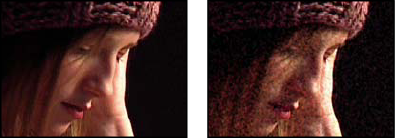
Original (left), and with effect applied (right)
- Noise
- The type of noise. Unique Random creates equal amounts of black and white noise. Squared Random creates high-contrast noise. Uniform Animation creates animated noise, and Squared Animation creates animated high-contrast noise. Grain produces grain-like noise similar to film grain.
- Hue
- The amount of noise added to hue values.
- Lightness
- The amount of noise added to lightness values.
- Saturation
- The amount of noise added to saturation values.
- Grain Size
- This control is active only for the Grain type of noise.
- Noise Phase (Noise HLS only)
- An input value to the random number generator for the noise. When you set keyframes for Noise Phase, the effect cycles through the phases to create animated noise. Greater value differences between keyframes increase the speed of the noise animation.
- Noise Animation Speed (Noise HLS Auto only)
- The speed of the noise animation. To accelerate or decelerate the noise animation, animate this property.