

About the Multi‑Camera Monitor
The Multi‑Camera Monitor plays the footage from each camera and a preview of the final edited sequence. When you record the final sequence, you click a camera preview to make it active and record footage from that camera. The active camera is indicated by a yellow border when in playback mode and a red border when recording.
The Multi‑Camera Monitor includes the standard
playback and transport controls and keyboard shortcuts. The Play
Around button  plays
the sequence in the preview display, including any preroll and postroll
frames specified in General Preferences.
plays
the sequence in the preview display, including any preroll and postroll
frames specified in General Preferences.
Note: If the Multi‑Camera
Monitor displays the same frame in large previews on both the left
and right side, the current clip is either not a multi‑camera clip
or a multi‑camera clip that is not enabled.
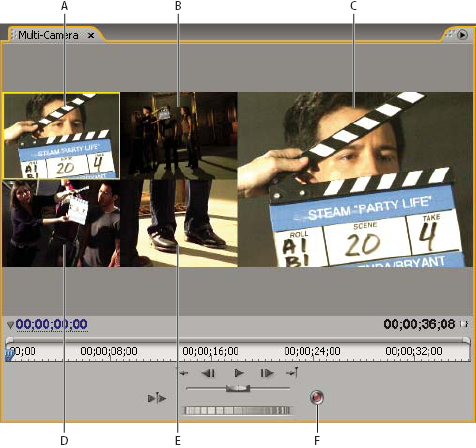
Multi‑Camera Monitor
- A.
- Camera 1
- B.
- Camera 2
- C.
- Recorded sequence preview
- D.
- Camera 3
- E.
- Camera 4
- F.
- Record button