

Leave Color effect
The Leave Color effect removes all colors from a clip except those similar to the Color To Leave. For example, a movie of a basketball game could be decolored except for the orange of the ball itself.
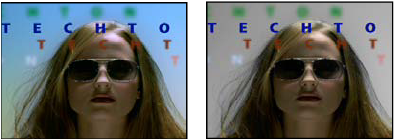
Original image (left), and with effect applied (right)
- Amount To Decolor
- How much color to remove. 100% causes areas of the image dissimilar to the selected color to appear as shades of gray.
- Tolerance
- The flexibility of the color-matching operation. 0% decolors all pixels except those that exactly match Color To Leave. 100% causes no color change.
- Edge Softness
- The softness of the color boundaries. High values smooth the transition from color to gray.
- Match Colors
- Determines whether colors’ RGB values or HSB values are compared. Choose Using RGB to perform more strict matching that usually decolors more of the image. For example, to leave dark blue, light blue, and medium blue, choose Using HSB and choose any shade of blue as Color To Leave.