

Compound Blur effect
The Compound Blur effect blurs pixels in the effect clip based on the luminance values of a control clip, also known as a blur layer or blurring map. By default, bright values in the blur layer correspond to more blurring of the effect clip, while dark values correspond to less blurring; select Invert Blur for light values to correspond to less blurring.
This effect is useful for simulating smudges and fingerprints, or changes in visibility caused by atmospheric conditions such as smoke or heat, especially with animated blur layers.
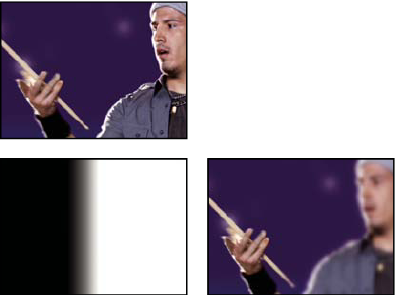
Original (left), blur layer (center), and result (right)
- Maximum Blur
- The maximum amount, in pixels, that any part of the affected clip can be blurred.
- Stretch Map To Fit
- Stretches the control clip to the dimensions of the clip to which it is applied; otherwise, the control clip is centered on the effect clip.