

Tools
The Tools
panel contains a number of tools for editing sequences in the Timeline panel.
When you select a tool, the pointer changes shape according to the selection.
For example, when you select the Razor tool and position the pointer over
a clip in the Timeline panel, the icon changes to a razor  . However,
the Selection tool icon
. However,
the Selection tool icon  may
change to reflect the task currently being performed. In some cases,
pressing a modifier key (such as Shift) as you use a tool changes
its function, and its icon changes accordingly. Select tools from
the Tools panel, or use a keyboard shortcut. You can resize the
Tools panel and orient it vertically or horizontally.
may
change to reflect the task currently being performed. In some cases,
pressing a modifier key (such as Shift) as you use a tool changes
its function, and its icon changes accordingly. Select tools from
the Tools panel, or use a keyboard shortcut. You can resize the
Tools panel and orient it vertically or horizontally.
. However,
the Selection tool icon may
change to reflect the task currently being performed. In some cases,
pressing a modifier key (such as Shift) as you use a tool changes
its function, and its icon changes accordingly. Select tools from
the Tools panel, or use a keyboard shortcut. You can resize the
Tools panel and orient it vertically or horizontally.Note:
The Selection tool is the default tool. It’s
used for everything other than specialized functions. If the program
isn’t responding as you expect, make sure that the Selection tool
is selected.
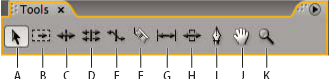
Toolbox
- A.
- Selection tool
- B.
- Track Selection tool
- C.
- Ripple Edit tool
- D.
- Rolling Edit tool
- E.
- Rate Stretch tool
- F.
- Razor tool
- G.
- Slip tool
- H.
- Slide tool
- I.
- Pen tool
- J.
- Hand tool
- K.
- Zoom tool