

Checkerboard effect
(High bit-depth) The Checkerboard effect creates a checkerboard pattern of rectangles, half of which are transparent.
View full size graphic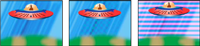
Matching color produces subtle result (center); using red
with high Width and low Height settings (right) creates striped
result.
- Anchor
- The point of origin of the checkerboard pattern. Moving this point offsets the pattern.
- Size From
-
How the dimensions of the rectangles are determined:
- Corner Point
- Each rectangle’s dimensions are those of the rectangle with opposite corners defined by the Anchor and Corner points.
- Width Slider
- A rectangle’s height and width are equal to the Width value, meaning the rectangles are squares.
- Width & Height Sliders
- A rectangle’s height is equal to the Height value. A rectangle’s width is equal to the Width value.
- Feather
- Thickness of the edge feather within the checkerboard pattern.
- Color
- The color of the non-transparent rectangles.
- Opacity
- The opacity of the colored rectangles.
- Blending Mode
- The blending mode to use to composite the checkerboard pattern on top of the original clip. The default None mode renders the checkerboard pattern only.