

About the Titler
You can think of the Titler as a collection of related panels. You can close the other panels without closing the Titler panel, or you can dock the panels to each other or to other parts of the interface. When the windows aren’t docked to the main editing interface, they always appear over the other panels, or float.
You can load more than one title into the Titler panel, and you can choose the one you want to view by choosing its name in the panel menu. (Click the down‑pointing triangle in the Titler tab to open the panel menu.)
Reopen a title when you want to change it or to duplicate it and base a new version on it. If you want to use a title in another project, you must first open its project and export the title using the File > Export > Title command. Then you can import it into another project as you would any other source file.
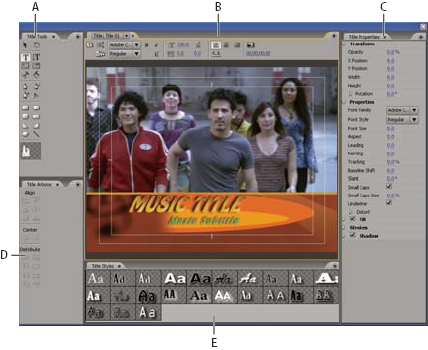
- A.
- Titler tools
- B.
- Titler main panel
- C.
- Title properties
- D.
- Titler actions
- E.
- Title styles