

Draw curves with the Pen tool
Draw curved segments by dragging the anchor points with the Pen tool. When you use the Selection tool to select an anchor point connecting curved segments, the segments display direction lines, which end in direction points. The angle and length of the direction lines determine the shape and size of the curved segments. Moving the direction lines reshapes the curves. A smooth point always has two direction lines that move together as a single, straight unit. When you drag the direction point of either direction line on a smooth point, both direction lines move simultaneously, maintaining a continuous curve at that anchor point. In comparison, a corner point can have two, one, or no direction lines, depending on whether it joins two, one, or no curved segments, respectively.
Corner point direction lines maintain the corner by working independently of one another. When you drag a direction point on a corner point’s direction line, the other direction line, if present, does not move. Direction lines are always tangent to (perpendicular to the radius of) the curve at the anchor points. The angle of each direction line determines the slope of the curve, and the length of each direction line determines the height, or depth, of the curve.
- Position the Pen tool where you want the curve segment
to end.
-
To create a C‑shaped curve, drag in a direction opposite to the direction that you dragged to create the previous anchor point.
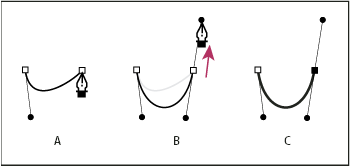 Drawing second point in curves
- A.
- Starting to drag second smooth point
- B.
- Dragging away from previous direction line, creating C‑shaped curve
- C.
- Result after releasing mouse button
-
To create an S‑shaped curve, drag in the same direction that you dragged to create the previous anchor point.
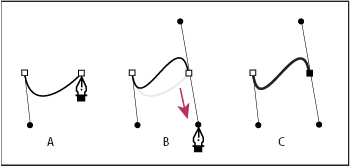 Drawing S curves
- A.
- Starting to drag new smooth point
- B.
- Dragging in same direction as previous direction line, creating S‑shaped curve
- C.
- Result after releasing mouse button
-