

Change a keyframe’s interpolation method
By changing and adjusting keyframe interpolation, you gain precise control over the rate of changes in your animations. You can choose either an interpolation type from a context menu or you can directly change one keyframe type to another by manually adjusting the keyframe or the handles.
Note: You can also use the Ease In and Ease Out
commands to quickly adjust keyframe interpolation.
View full size graphic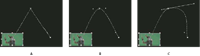
Changing keyframe interpolation for the Position parameter
of the Motion effect
- A
- Linear spatial keyframe
- B.
- Auto Bezier interpolation
- C.
- Continuous Bezier interpolation
- Choose an interpolation method from the context menu:
- Linear
- Creates a uniform rate of change between keyframes.
- Bezier
- Lets you manually adjust the shape of the graph, and the rate of change, on either side of a keyframe. You can create very smooth changes using this method.
- Auto Bezier
- Creates a smooth rate of change through a keyframe. As you change a keyframe’s value, the Auto Bezier direction handles change to maintain a smooth transition between keyframes.
- Continuous Bezier
- Creates a smooth rate of change through a keyframe. However, unlike the Auto Bezier interpolation method, Continuous Bezier lets you adjust direction handles manually. As you change the shape of a graph on one side of a keyframe, the shape on the other side of the keyframe changes to maintain a smooth transition.
- Hold
- Changes a property value without gradual transition (sudden effect changes). The graph following a keyframe with the Hold interpolation applied appears as a horizontal straight line.
- Ease In
- Slows down the value changes entering a keyframe.
- Ease Out
- Gradually accelerates the value changes leaving a keyframe.
Note: Although interpolation methods can vary the rate at which a property changes between keyframes, they cannot change the actual duration between keyframes. Duration is determined by the time (or distance in the time ruler) between keyframes.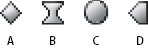 Keyframe interpolation methods
- A.
- Normal In/Out
- B.
- Bezier/Continuous Bezier/Ease In/Ease Out
- C.
- Auto Bezier
- D.
- Hold