

Find and group effects
Standard effects are listed in the Effects panel and are organized into two main bins, Video Effects and Audio Effects. Within each bin, effects are grouped by type in nested bins. For example, the Blur and Sharpen bin contains effects that defocus an image, such as Gaussian Blur and Directional Blur. Audio effects are also grouped by the type of audio clips they support: mono, stereo, or 5.1. You can also locate an effect by typing the effect name in the Contains text box. You can add bins to contain your favorite or most frequently used effects.
To open the Effects panel, choose Window > Effects, or click the Effects tab.
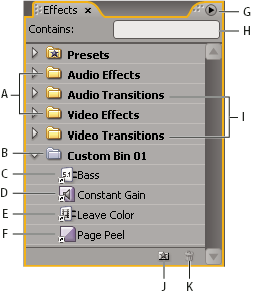
- A.
- Effects bins
- B.
- Custom bin
- C.
- Audio effect
- D.
- Audio transition
- E.
- Video effect
- F.
- Video transition
- G.
- Effects panel menu
- H.
- Contains text box
- I.
- Transitions bins
- J.
- New Custom bin
- K.
- Delete Custom Item
 Find an effect
 Click in the Contains field of
the Effects panel, and type the name of the effect.
Click in the Contains field of
the Effects panel, and type the name of the effect.As you type, the Effects panel filters out any effects not containing the characters you type.
Create bins of favorite effects
- In the Effects panel, click the
New Custom Bin button
 , or
choose New Custom Bin from the Effects panel menu. A new Custom
bin appears in the Effects panel. You can rename it.
, or
choose New Custom Bin from the Effects panel menu. A new Custom
bin appears in the Effects panel. You can rename it. - Drag effects to the Custom bin. A copy of the effect is listed in the Custom bin. You can create additional Custom bins, which are numbered.
- To rename the custom bin, click the existing name to select the folder, click it again to select the name field, and type the new name.
 , choose
Delete Custom Items from the Effects panel menu, or press Delete.
, choose
Delete Custom Items from the Effects panel menu, or press Delete.