

Turbulent Displace effect
The Turbulent Displace effect uses fractal noise to create turbulent distortions in an image. For example, use it to create flowing water, funhouse mirrors, and waving flags.
View full size graphic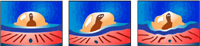
Original image (left), and with variations of effect applied
(center and right)
- Displacement
- The type of turbulence used. Turbulent Smoother, Bulge Smoother, and Twist Smoother each perform the same operations as Turbulent, Bulge, and Twist, except that the Smoother options create smoother warps and take longer to render. Vertical Displacement warps the image vertically only. Horizontal Displacement warps the image horizontally only. Cross Displacement warps the image both vertically and horizontally.
- Amount
- Higher values cause more distortion.
- Size
- Higher values cause larger areas of distortion.
- Offset (Turbulence)
- Determines the portion of the fractal shape used to create the distortion.
- Complexity
- Determines the level of detail in the turbulence. Lower values cause smoother distortions.
- Evolution
-
Animating this setting results in changes of the turbulence
over time.
Note: Although the Evolution value is set in units called revolutions, it’s important to realize that these revolutions are progressive. The evolution state continues to progress infinitely at each new value. Use the Cycle Evolution option to return the Evolution setting to its original state at each revolution.
- Evolution Options
-
Evolution Options provide controls that render the effect
for one short cycle and then loop it for the duration of your clip.
Use these controls to prerender turbulence elements into loops,
and thus speed up rendering time.
- Cycle Evolution
- Creates a loop that forces the evolution state to return to its starting point.
- Cycle
-
The number of revolutions of the Evolution setting that the
fractal cycles through before it repeats. The timing of the Evolution
cycles is determined by the amount of time between Evolution keyframes.
Note: The Cycle control affects only the state of the fractal, not geometrics or other controls, so you can get different results with different Size or Offset settings.
- Random Seed
-
Specifies a value from which to generate the fractal noise. Animating
this property results in flashing from one set of fractal shapes
to another within the same fractal type. For smooth transition of
the roughness, use the Evolution control.
Note: Create new turbulence animations by reusing previously created Evolution cycles and changing only the Random Seed value. Using a new Random Seed value alters the noise pattern without disturbing the evolution animation.
- Pinning
- Specifies which edges to pin so that the pixels along those edges aren’t displaced.
- Resize Layer
- Enables the distorted image to expand past the clip’s bounding box.